> ## Documentation Index
> Fetch the complete documentation index at: https://restate-6d46e1dc-cloud-docs.mintlify.site/llms.txt
> Use this file to discover all available pages before exploring further.

# Deno Deploy

> Run your TypeScript services on Deno Deploy

Deploy your Restate services on Deno Deploy.
This guide covers project configuration, service registration, and security setup.

<Tip>
  Follow the [quickstart](/quickstart#deno) to try Deno and Restate locally.
</Tip>

## Deploying to Deno Deploy

<Steps titleSize="h3">
  <Step title={"Set up your project"}>
    <Tabs>
      <Tab title="New project">
        Start from the [Deno template](https://github.com/restatedev/deno-template):

        [![Deploy on Deno](https://deno.com/button)](https://console.deno.com/new?clone=https://github.com/restatedev/deno-template)
      </Tab>

      <Tab title="Existing Deno project">
        Import the Restate SDK with the `fetch` component:

        ```typescript theme={null}
        import * as restate from "@restatedev/restate-sdk/fetch";

        // Create the Restate endpoint
        // Here you need to register your services
        const handler = restate.createEndpointHandler({
            services: [greeter],
            bidirectional: true,
        });

        // Serve using Deno
        Deno.serve({ port: 9080 }, handler);
        ```
      </Tab>
    </Tabs>
  </Step>

  <Step title={"Secure your service with request identity validation"}>
    Deno Deploy services are public HTTP endpoints. Secure your service with request identity validation so that it only accepts requests from the Restate environment you trust.

    <Tabs>
      <Tab title={"Restate Cloud / BYOC"} icon={"/logo/restate-cloud-mini.svg"}>
        Restate Cloud and BYOC environments create and manage the request identity key for you.

        Copy the environment's public key from [**Developers > Security > HTTP endpoints**](https://cloud.restate.dev/to/developers/integration#http-endpoints) in the Restate Cloud UI.
      </Tab>

      <Tab title={"Restate OSS"} icon={"/logo/restate-mini.svg"}>
        Request identity uses an ED25519 key pair. Give the private key to Restate so it can sign requests, and give the public key to your services so they can verify those signatures.

        Choose one of the following ways to generate the keys:

        <AccordionGroup>
          <Accordion title="Option 1: Let Restate output the public key">
            1. Generate the private key:

            ```bash theme={null}
            openssl genpkey -algorithm ed25519 -outform pem -out private.pem
            ```

            2. Provide its path to Restate on startup:

            ```bash theme={null}
            export RESTATE_REQUEST_IDENTITY_PRIVATE_KEY_PEM_FILE=private.pem
            ```

            3. Start Restate and copy the corresponding public key from the startup log. Restate prints it in the compact format expected by the SDK:

            ```log theme={null}
            INFO restate_service_client::request_identity::v1
            Loaded request identity key
            kid: "publickeyv1_w7YHemBctH5Ck2nQRQ47iBBqhNHy4FV7t2Usbye2A6f"
            path: private.pem
            ```
          </Accordion>

          <Accordion title="Option 2: Generate both key files beforehand">
            Run this script to generate `private.pem` and write the corresponding `publickeyv1_...` value to a `public-key` file before starting Restate:

            <Tabs sync={false}>
              <Tab title="macOS" icon="apple">
                Install OpenSSL 3 with Homebrew, then run the script:

                ```bash theme={null}
                brew install openssl@3
                ```

                ```shell expandable generate.sh theme={null}
                #!/usr/bin/env bash
                set -euo pipefail

                openssl_bin="$(brew --prefix openssl@3)/bin/openssl"

                # generate private key
                "$openssl_bin" genpkey -algorithm ed25519 -outform pem -out private.pem
                echo "Wrote private key to private.pem"

                # encode public key
                encoded=$("$openssl_bin" pkey -in private.pem -pubout -outform DER 2>/dev/null |
                tail -c +13 |
                od -An -v -tu1 |
                awk '
                BEGIN {
                  alphabet = "123456789ABCDEFGHJKLMNPQRSTUVWXYZabcdefghijkmnopqrstuvwxyz"
                  leading = 1
                }
                {
                  for (i = 1; i <= NF; i++) {
                    byte = $i
                    if (leading && byte == 0) {
                      zeroes++
                      continue
                    }
                    leading = 0
                    carry = byte
                    for (j = 0; j < digit_count; j++) {
                      carry += digits[j] * 256
                      digits[j] = carry % 58
                      carry = int(carry / 58)
                    }
                    while (carry > 0) {
                      digits[digit_count++] = carry % 58
                      carry = int(carry / 58)
                    }
                  }
                }
                END {
                  for (i = 0; i < zeroes; i++) printf "1"
                  for (i = digit_count - 1; i >= 0; i--) {
                    printf "%s", substr(alphabet, digits[i] + 1, 1)
                  }
                }')

                echo -n "publickeyv1_${encoded}" > public-key
                echo "Wrote publickeyv1_${encoded} to public-key"
                ```
              </Tab>

              <Tab title="Linux" icon="linux">
                This script requires Bash, OpenSSL, `awk`, and GNU Coreutils:

                ```shell expandable generate.sh theme={null}
                #!/usr/bin/env bash
                set -euo pipefail

                # generate private key
                openssl genpkey -algorithm ed25519 -outform pem -out private.pem
                echo "Wrote private key to private.pem"

                base58_chars="123456789ABCDEFGHJKLMNPQRSTUVWXYZabcdefghijkmnopqrstuvwxyz"
                # encode public key
                encoded=$(openssl ec -in private.pem -inform pem -pubout -outform der -out /dev/stdout 2>/dev/null |
                tail -c +13 |
                basenc --base16 "${1:-/dev/stdin}" -w0 |
                if
                read
                [[ $REPLY =~ ^((00)*)(([[:xdigit:]]{2})*) ]]
                echo -n "${BASH_REMATCH[1]//00/1}" # leading 0s -> 1
                (( ${#BASH_REMATCH[3]} > 0 ))
                then
                dc -e "16i0${BASH_REMATCH[3]^^} Ai[58~rd0<x]dsxx+f" | # hex bytes to indexes into the char string
                while read -r
                do echo -n "${base58_chars:REPLY:1}"
                done
                fi)

                echo -n "publickeyv1_${encoded}" > public-key
                echo "Wrote publickeyv1_${encoded} to public-key"
                ```
              </Tab>
            </Tabs>
          </Accordion>
        </AccordionGroup>
      </Tab>
    </Tabs>

    Configure the key in your Restate SDK endpoint before deploying.

    ```typescript {"CODE_LOAD::ts/src/develop/serving_identity_serverless.ts#identity"} theme={null}
    const handler = restate.createEndpointHandler({
      services: [myService],
      identityKeys: ["publickeyv1_w7YHemBctH5Ck2nQRQ47iBBqhNHy4FV7t2Usbye2A6f"],
    });
    ```

    The public key is not secret, so it is safe to include it directly in your service source code or configuration files.
  </Step>

  <Step title={"Register the service to Restate"}>
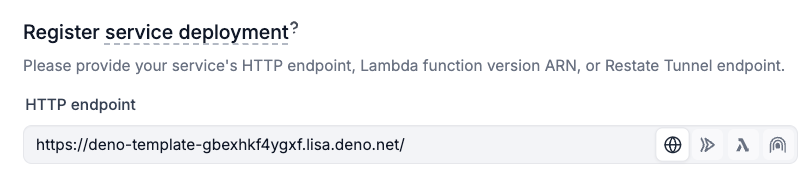
    Once deployed on Deno Deploy EA, use **Preview URLs** so that Restate can target specific [service versions](/services/versioning).

    <div className="hidden-tabs">
      <Tabs>
        <Tab title={"Restate Cloud / BYOC"} icon={"/logo/restate-cloud-mini.svg"}>
          Register the service with Restate [via the UI](https://cloud.restate.dev/to/overview?register-deployment=true):
        </Tab>

        <Tab title={"Restate OSS"} icon={"/logo/restate-mini.svg"}>
          Register the service with Restate [via the UI](http://localhost:9070/ui/overview?register-deployment=true):
        </Tab>
      </Tabs>
    </div>

    <Frame>
      <img src="https://mintcdn.com/restate-6d46e1dc-cloud-docs/AwBPT6LKVrnuri2B/img/services/deploy/deno-deploy-register-url.png?fit=max&auto=format&n=AwBPT6LKVrnuri2B&q=85&s=cf6d14372d44b524a5cfe6366de66bda" alt="Deno Deploy UI" width="100%" data-path="img/services/deploy/deno-deploy-register-url.png" />
    </Frame>

    Or register the service with the CLI:

    ```shell theme={null}
    npx @restatedev/restate deployments register \
      https://your-project-name-<deployment_id>.deno.dev
    ```
  </Step>

  <Step title={"Send your first request"}>
    <div className="hidden-tabs">
      <Tabs>
        <Tab title={"Restate Cloud / BYOC"} icon={"/logo/restate-cloud-mini.svg"}>
          You're set up! Go to the [Overview page > Greeter > Playground](https://cloud.restate.dev/to/overview?servicePlayground=Greeter#/operations/greet) and start sending requests to your service.
        </Tab>

        <Tab title={"Restate OSS"} icon={"/logo/restate-mini.svg"}>
          You're set up! Go to the [Overview page > Greeter > Playground](http://localhost:9070/ui/overview?servicePlayground=Greeter#/operations/greet) and start sending requests to your service.
        </Tab>
      </Tabs>
    </div>
  </Step>
</Steps>

## CI/CD Automation

You can set up automation to register new [Restate service versions](/services/versioning) every time you deploy to Deno Deploy:

<Tip>
  If you've followed the steps above, then you already have the GitHub Actions workflow set up. All you need to do is to add the secrets below to your project.
</Tip>

<Note>
  Create the project in the [Deno console](https://console.deno.com/) before the first workflow run.
</Note>

<Tabs>
  <Tab title={"Restate Cloud / BYOC"} icon={"/logo/restate-cloud-mini.svg"}>
    ```yml .github/workflows/deploy.yml {"CODE_LOAD::https://raw.githubusercontent.com/restatedev/deno-template/refs/heads/main/.github/workflows/deploy.yml?remove_comments"} theme={null}
    name: Register to Restate

    on:
      repository_dispatch:
        types: [deno_deploy.build.routed]

    jobs:
      notify:
        runs-on: ubuntu-latest
        steps:
          - name: Register Restate deployment
            env:
              RESTATE_ADMIN_URL: ${{ secrets.RESTATE_ADMIN_URL }}
              RESTATE_AUTH_TOKEN: ${{ secrets.RESTATE_AUTH_TOKEN }}
            run: npx -y @restatedev/restate deployment register -y ${{ github.event.client_payload.revision.preview_url }}
    ```

    This workflow needs the following [**GitHub Actions repository secrets**](https://docs.github.com/en/actions/how-tos/write-workflows/choose-what-workflows-do/use-secrets):

    * `RESTATE_ADMIN_URL`: The Admin URL. You can find it in [Developers > Admin URL](https://cloud.restate.dev/to/developers/integration#admin)
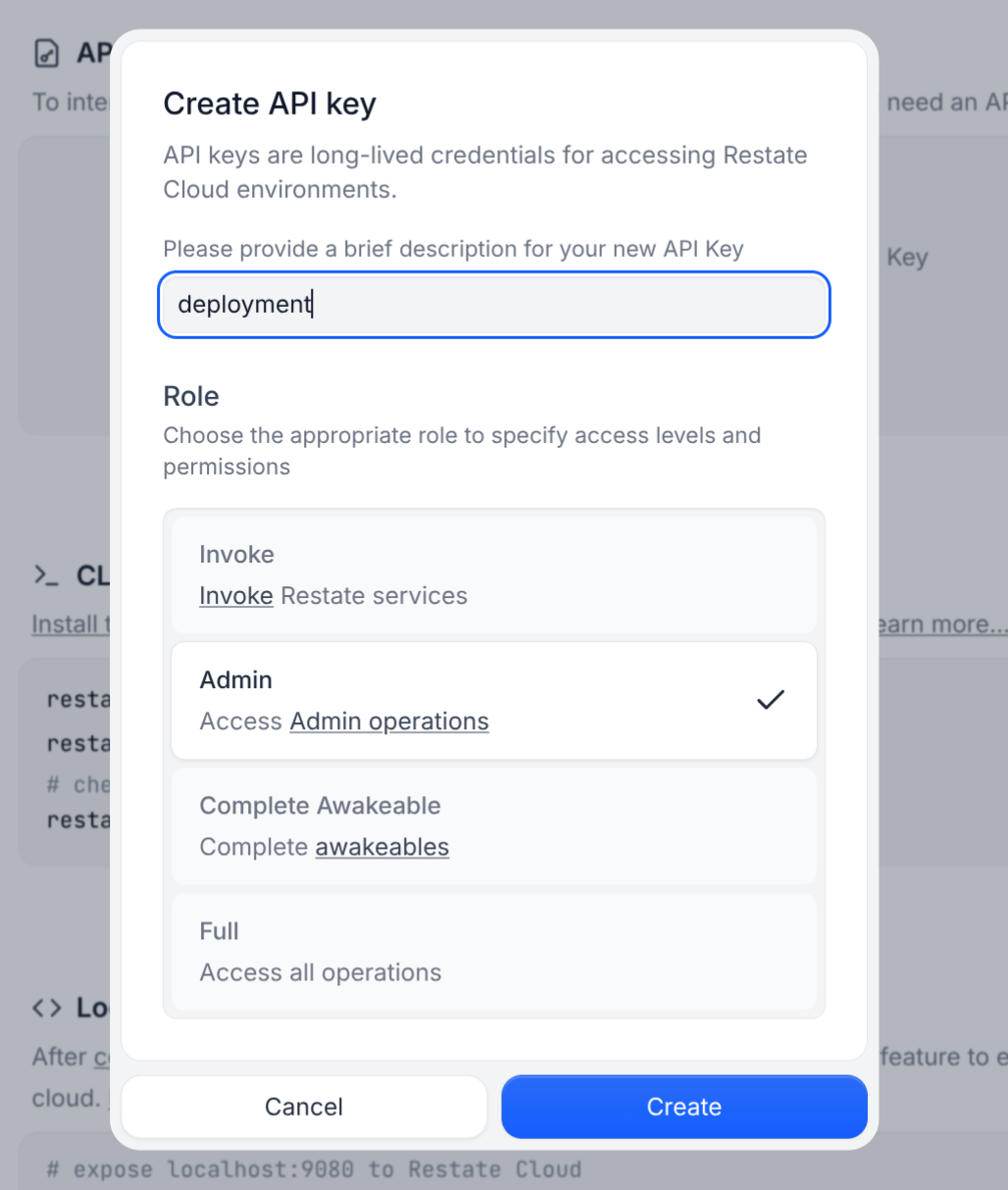
    * `RESTATE_AUTH_TOKEN`: Your Restate Cloud or BYOC auth token. To get one, go to [Developers > API Keys > Create API Key](https://cloud.restate.dev/to/developers/integration?createApiKey=true\&createApiKeyDescription=deployment-key\&createApiKeyRole=rst:role::AdminAccess), and make sure to select **Admin** for the role
          <Accordion title="View">
            <img src="https://mintcdn.com/restate-6d46e1dc-cloud-docs/G3yDE3RlKqX3D28h/img/services/deploy/deployment-token.png?fit=max&auto=format&n=G3yDE3RlKqX3D28h&q=85&s=3d8be70409f93176212839564318d8d8" alt="Token setup" width="50%" data-path="img/services/deploy/deployment-token.png" />
          </Accordion>
  </Tab>

  <Tab title={"Restate OSS"} icon={"/logo/restate-mini.svg"}>
    ```yml .github/workflows/deploy.yml {"CODE_LOAD::https://raw.githubusercontent.com/restatedev/deno-template/refs/heads/main/.github/workflows/deploy.yml?remove_comments"} theme={null}
    name: Register to Restate

    on:
      repository_dispatch:
        types: [deno_deploy.build.routed]

    jobs:
      notify:
        runs-on: ubuntu-latest
        steps:
          - name: Register Restate deployment
            env:
              RESTATE_ADMIN_URL: ${{ secrets.RESTATE_ADMIN_URL }}
              RESTATE_AUTH_TOKEN: ${{ secrets.RESTATE_AUTH_TOKEN }}
            run: npx -y @restatedev/restate deployment register -y ${{ github.event.client_payload.revision.preview_url }}
    ```

    This workflow needs the following [**GitHub Actions repository secrets**](https://docs.github.com/en/actions/how-tos/write-workflows/choose-what-workflows-do/use-secrets):

    * `RESTATE_ADMIN_URL`: The URL through which GitHub Actions can reach your Restate Admin API
    * `RESTATE_AUTH_TOKEN`: Set this token if GitHub Actions reaches the Admin API through a reverse proxy that accepts bearer token authentication
  </Tab>
</Tabs>

<AccordionGroup>
  <Accordion title="Deno Deploy Classic">
    For [Deno Deploy Classic](https://docs.deno.com/deploy/classic/), we suggest the following CI/CD setup that deploys to Deno and then registers the deployment with Restate:

    Configure `RESTATE_ADMIN_URL` and `RESTATE_AUTH_TOKEN` as described above for your Restate environment.

    ```yml theme={null}
    name: Deploy Deno

    on:
      push:
        branches:
          - main

    env:
      # Create the Deno project going to https://dash.deno.com/new_project linking this repository.
      # When creating the project, check **Just link the repo, I’ll set up GitHub Actions myself**.
      # Make sure this project name matches the deno project.
      DENO_PROJECT_NAME: ${{ vars.DENO_PROJECT_NAME }}

    jobs:
      deploy:
        permissions:
          id-token: write # required
          contents: read
        runs-on: ubuntu-latest
        timeout-minutes: 60
        steps:
          - uses: actions/checkout@v4
          - uses: denoland/setup-deno@v2
            with:
              deno-version: v2.x

          # Deploy using deployctl
          - name: Deploy to Deno Deploy
            uses: denoland/deployctl@v1
            id: deploy
            with:
              project: ${{ env.DENO_PROJECT_NAME }}
              entrypoint: main.ts

          - name: Register Restate deployment
            env:
              RESTATE_ADMIN_URL: ${{ secrets.RESTATE_ADMIN_URL }}
              RESTATE_AUTH_TOKEN: ${{ secrets.RESTATE_AUTH_TOKEN }}
            # Revision URL https://docs.deno.com/deploy/classic/deployments/#production-vs.-preview-deployments
            run: npx -y @restatedev/restate deployment register -y https://${{ env.DENO_PROJECT_NAME }}-${{ steps.deploy.outputs.deployment-id }}.deno.dev
    ```
  </Accordion>
</AccordionGroup>
